
REOEngine runs the whole BPO and MSR workflow: import comps, make adjustments, document repairs, draft supporting language, review, approve, and prepare the file for portal entry.

How It Works
From raw MLS to portal-ready, in five steps.
REOEngine carries every BPO and MSR through the path you already follow, from comp import to the finished report your AM receives.


Features
Built for the way REO valuation actually works.
Not generic workflow software with real estate bolted on. Every capability reflects the way BPOs and MSRs are actually completed, reviewed, and delivered.
Comp Import
Stop re-typing MLS data.
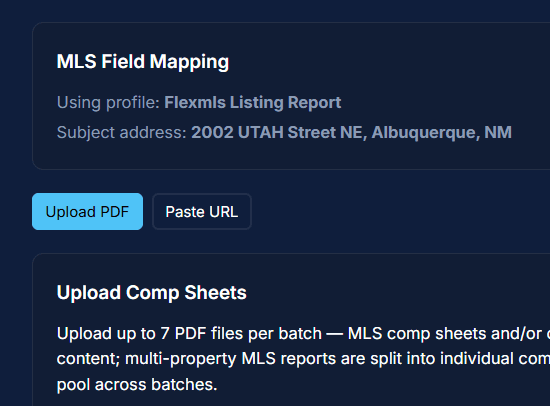
Upload MLS Listing Reports. REOEngine reads every listing, separates active from sold, and builds the comp pool for you to review. Works with multiple MLS Systems. Upload your Subject Property and your Comparables without data entry.
Valuation Engine
Set one value. Derive the rest.
Enter the fully repaired value first. REOEngine derives the other market values, scores how well the comps agree, and keeps adjustments consistent. Or, build your value entirely from adjustments (traditional valuation).

AI NARRATIVES
AI drafts the narratives. You retain the judgment.
REOEngine drafts market conditions, comments, and supporting narrative from the property, comps, ZIP, and reporting month. You review and edit the language before approval, so the final judgment stays yours.

Review & Approve
Catch problems before submission.
Hard stops and plain-language warnings flag missing or inconsistent work before approval. Once approved, the valuation locks and every change is recorded.

Daily Digest
Wake up to one task list.
REOEngine checks Asset Management Portals overnight and gathers new assignments, due dates, and status changes into one morning view.
Includes all portals, tasks, dates and priorities in one simple email. Daily.

Role-Based Workflow
One asset. Four roles. Zero dropped balls.
Agents, admins, VAs, and runners work from role-specific queues and handoffs, all tied to the same asset.

Processing
See it run a real valuation.
From uploading comparables and selecting the best ones through adjustments, repairs, AI-generated comments, market conditions, photo uploads, and automated captions—everything leads to one comprehensive review, score, and approval.
ADJUSTMENT GRID
Adjust every comp in one view.

You make the adjustments. REOEngine keeps the logic consistent.
Compare each listing against the subject across GLA, age, condition, garage, AC, lot size, and more. Mark each factor superior, inferior, or similar while the valuation updates.
REOEngine measures how tightly the selected comps agree and explains the result in plain language. Outliers, missing information, and weak support become visible before the valuation leaves your desk.
COHERENCE & REVIEW
Know whether the comps support the number.

A defensible valuation, not just a calculated average.
MARKET CONDITIONS
Draft the narrative from the evidence.

The system drafts the language. The judgment remains yours.
Market conditions and report comments draft from the property, comps, ZIP, and reporting month. You review and edit every word before approval.
Record repairs, costs, and property condition in the same workflow. Upload photos and let REOEngine draft clear, property-specific industry standard captions that you can review and edit before approval.
REPAIRS, PHOTOS & CAPTIONS
Quickly document the condition with AI support.

Repairs, photos, and captions stay tied to both the asset and the final report. They are reusable on future BPOs and MSRs.
Deliverables
Everything needed to finish a BPO or MSR. Complete, approved, and ready to use.
Subject data, selected comps, adjustments, values, repairs, narrative, market conditions, and photos—organized into one approved asset record and a clear, portal-ready handoff.
APPROVED VALUATION

Selected comps, adjustments, all derived values, repairs, comments, market conditions, photos, and captions remain tied to one approved valuation record.
PORTAL READY HANDOFF

Once approved, the final values and supporting details are locked and organized for portal entry—reducing rework, transcription errors, and back-and-forth between the agent and VA.
REUSABLE ASSET RECORD
Start the Next Task Ahead of the Game

The property history, prior comps, repairs, photos, narratives, and completed work remain available for future BPOs and MSRs, so the team does not rebuild the file from scratch.
FAQ
Frequently asked questions.
The questions REO agents actually ask before switching.
Do I have to change how I do my BPOs?
I want to make sure my data is safe. Can another brokerage see my comps or clients?
Which MLS systems and portals does it work with?
Does it handle MSRs too, or just BPOs?
Do I need a VA or a team to use it?
What does it cost?
Who built REOEngine?
How do I get started?
Request Access
Request early access.
Onboarding is hands-on: MLS mapping, portal connections, branding, and your first BPO walked through with you. Tell us about your brokerage and we’ll be in touch.
Join us for our Beta Release
We are currently undertaking a Beta rollout of REOEngine. Start with a 30-day free trial, no credit card required.
Access is limited. Not all Brokers will qualify. We are seeking Brokers who complete between 5-50 BPOs per month. Inquire even if you’re unsure if you’re a fit.

Engineered for REO. Every Asset. Better Results.
© 2026 Collabricon Corporation. All rights reserved.